Showing posts with label photoshop. Show all posts

Monday, 1 February 2010

How different Photographic Treatments change the look of a Subject

Take a bunch of hydrangeas, a hand painted ceramic bowl, a string of pearls, a cedar table, some floaty organza and a couple of torches.  Add to this mix your favourite camera equipment and your editing skills.  Get busy and arrange the items in a pleasant fashion. And now experiment!

In the first photograph, a standard 50mm lens – the plastic fantastic, diffused torchlight, and a long exposure of a couple of seconds was used.  The diffused torchlight was used to “paint” the light onto the hydrangeas.  The brightness, contrast, levels were then adjusted in Photoshop to get this final results.
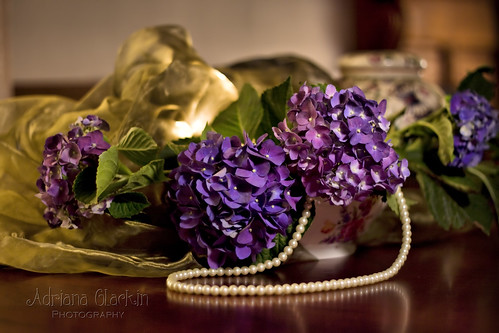
Still Life Hydrangeas - straight photo

There’s a real trend toward adding textured layers to photographs these days.  Adding textures really changes the feel of the photo.  It somehow ages the photo, giving it a real retro/grungy/moody look.  I recommend you shoot your own textures or if you really prefer, you can obtain free textures by simply searching Google for “free textures”.  I’ve used 3 different texture layers (my own) to the original image, and have blended them using varying opacities and blending modes.   I find I use overlay, soft light, hard light and multiply the most.
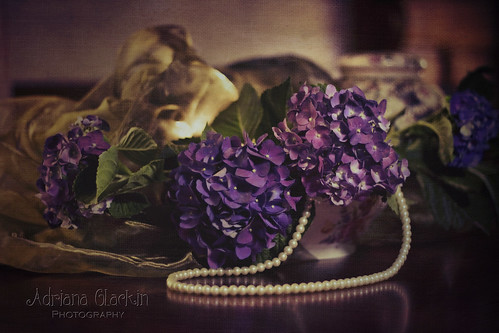

still life hydrangeas - textured

This image is identical to the image above - it has been layered with textures to change it's appearance to a more moody and vintage look.
This final image was shot using a very different technique – in fact it’s a blend of two techniques that I enjoy – the dreamy Lensbaby and the Through the Viewfinder techniques are absolute favourites of mine.  Different brands of Twin Reflex cameras will also yield varying results.  So, in these final two images, I used the Lensbaby Muse with the +4 macro filter; I inserted that into the “tube of darkness” which directly points to the viewfinder on the top of the Twin Reflex Camera.  Using the Muse lens, really softened the overall look of the image and the square format plus some cross-processing, gives it an aged appearance.  Follow this link if you’d like to know more about the Through the Viewfinder technique.
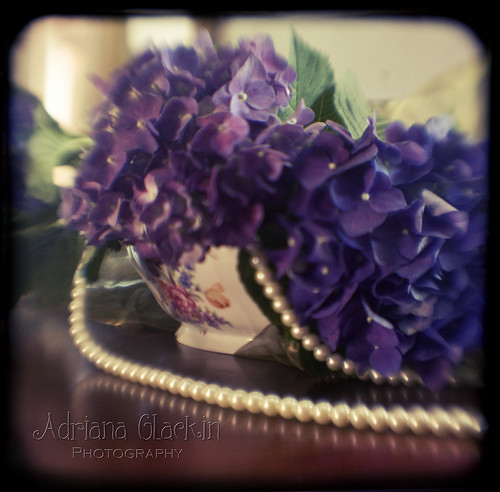

Hydrangea TtV - argus
Through the Viewfinder using Lensbaby Muse +macro 4 filter and Argus Argoflex Camera
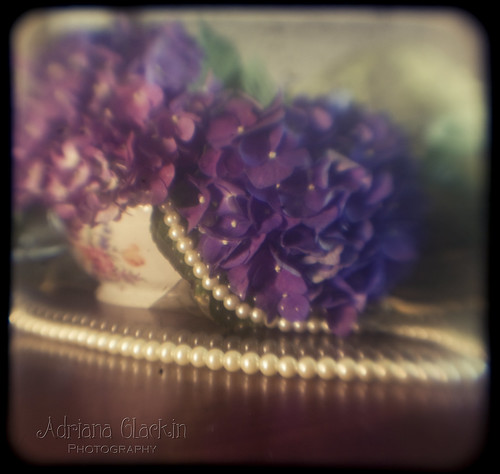
Day 31 of 365
Through the Viewfinder using Lensbaby Muse + macro 4 filter and Kodak Duoflex Camera


Coming Soon - How to apply textures to your images.

Monday, 22 September 2008

Feature Monday - Photographic Treatments

Well, the discussion about "treatments" has been to-ing and fro-ing for a while now over at RedBubble. With comments like "Ooo, nice treatment!" being made on their work, artists just cannot be sure that a comment such as that is a positive or derogatory term. Do members assume that the image created was done so with just one click of an editing program, was it done purely in camera, or did it take hours and many layers later to create such an image? With the mass availability of inexpensive digital cameras and editing software, taking photos of anything and everything has never been more popular. And you only need to google Photoshop plugins, and you are flooded with endless choices of easy one-touch editing add-ons that will instantly "create" that special image for you. So, of course many will think that anything that is out of the ordinary would have been done while using an instant plugin filter. This isn't always the case - and this is what offends some artists when others leave comments such as "nice treatment". Perhaps, along with our instant world, we have also become lazy when using the written language. So when leaving comments like "nice treatment", what we're really meaning is "Excellent choices" as put so well by Shawhouse - mind you he also went on to add "I think you made excellent choices to arrive at the eye-catching image you posted here and that I can barely see on my stupid, sucky monitor that I inherited from my little brother a hundred years ago, I should really upgrade, but I’ll never afford anything decent, I should really get roommates…".

Using an example of a simple subject everyone has available to them - and apple or similar - the challenge went out to the members of A Photographer's Craft. Show us their best "treatment" - in other words, show us their interpretation of that subject. Below are examples of apple images from RedBubble members who took part in the challenge. Each is of an apple, and each has applied their own spin, interpretation, treatment - call it what you will - to make that image their own.

So, if you're going to be jumping onto sites such as Redbubble, or Flickr, and you see a WOW image that simply takes your breath away, leave a comment, and take the time to explain why you like it, rather than just saying "Ooo, nice treatment"!


"Apples" by Adrian Rachele


Red Bubble Gallery

Red Bubble Gallery
view my photography at Red Bubble