Monday, 14 January 2013

How to Watermark your Images

It's about this time of year that I consider updating the watermark I use when I add images to sites such as Flickr. The trouble with this is that I can never seem to remember how I did the previous one... Add to that, I've also been asked by a couple of friends to show them how to add watermarks to their images, so I thought I'd write a step-by-step of how I created this current watermark.


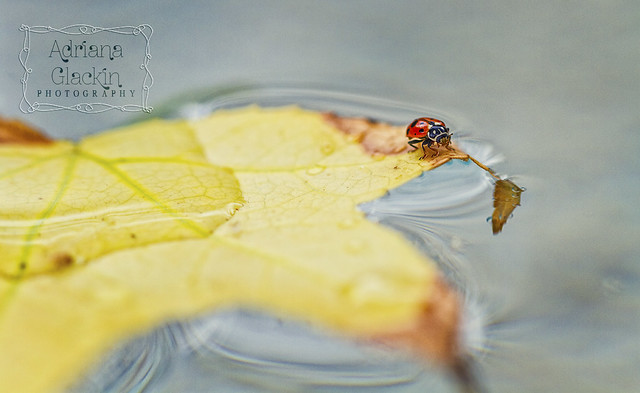
ladybird I 

1. Choose a font, any font, preferably one you like and that can be a sort of signature for you. No doubt you have hundreds of fonts on your computer, so open up a document, type your name (or whatever text you want to use for your watermark) and have a play with the fonts you already have. If you're not happy you have The Font, then turn to the internet - that's what it's there for! I found this font from dafont and it's called znikomit No24 by gluk. The swirly frame was one I had made and used for a previous project, but you don't need to use a frame for your watermark.

2. I use PS but I'm sure that any photo editing software can be used. (These instructions will be PS oriented.) Open up a new file to a size of 4300 x 2300, set layer to white. But to be honest, the size can be approximate, as you'll re-size the watermark down to size according to each image you watermark.

3. Select the text symbol and then select a text colour. I've chosen #a6a6a6 for mine. Type your name on that layer.


4. Go to your Layers menu and select Blending Options. Because the font I have chosen is quite fine, I've selected Bevel and Emboss as well as Drop Shadow. Depending on the font you choose, you may find this step unnecessary. I have also selected Colour overlay and set it to negative image.
 

You can see the effect of the blending options on a heavier font:


5. I added my swirl frame on a new layer and inversed the colours (it was black, inversed to white) then applied the same blending option as above:


At this stage, it's still too 'dainty' and almost invisible on even the plainest of images. This won't be the case if the font you have chosen is bulkier. If you have chosen a dainty font and/or frame, simply duplicate both the text and frame 2 or even 3 times. Practice popping the watermark on one of your images to see if you're happy with the effect. You may find that you don't need to duplicate the blending effect on each duplicated layer, so simply disable the blending option as you see fit.

6. Once you're happy with the watermark, it's time to group all the layers together using the "Create a new Group" option in the Layers palette (red circle). Drag each layer onto the new folder (green circle). You will notice the Blending Mode is now "Pass through". Save this as a .pdf file:


7. Time to grab one of your images and test out your new watermark. Grab your folder, you'll notice I've called mine "ZNIKO grey" and copy that to one of your open images. How you size the watermark, where you position it and how you blend it to your photo will depend on each image and of course your own personal preference:


So now you should be good to go. I hope you've found this How To easy to follow and implement..

What are your thought on watermarks? Do you use them?  If not, I'd love to hear why. 
 
If you have any questions, drop me a comment.

Friday, 4 January 2013

Featured Image over at Photographers Connection

I can't tell you how tickled pink I am at having my final image of the "Photographer's 52-Captures Challenge" chosen as Fan Photo of the Week! Following their themes, I was determined to create a new image for each week and what a great opportunity that has been to improve my skills and try things that I would probably never get around to trying. Photographers Connection have started a new 52 week challenge for 2013, but I'll be sitting this one out as I'll be concentrating on a few other challenges this year. A major challenge for me will be the Ride to Conquer Cancer that will take place in October 2013.To find out more, caste your eyes to the left of this page and click on the blue and yellow cycling link. I would love it if you could support my ride :)

Week 52 ~ Self-Portrait
Week 52 ~ Self-Portrait | Celebrating the end of the project - yeh!

Are you a fan of Photographers Connection Facebook page? Maybe you should 'like' their page and join in the fun! Have you tried photography projects before? Other than Photo-a-Day and 52-week challenges, what other photography challenges have you tried? Drop me a comment, I would love to hear about your photography challenges and projects.

Wednesday, 2 January 2013

Happy New Year! Especially to you, Overzealous White T-Shirt Hero Dude

Happy New Year! And yes, I also wish the overzealous White T-Shirt Hero Dude a Happy New Year, even if he did almost ruin the start of the year for me and quite a few other people. Against my normally conservative and no-extreme-action disposition, I said yes to going out on a little boat with a few friends on Sydney Harbour for New Year's Eve. Surprisingly, every other person who owns a boat had the exact same idea. Who knew? Aside from the congestion of what must be the Harbour's busiest day, seeing the fireworks from the vantage of the water was really something quite special. So special, I recorded a few clips using my iPhone and edited them and, as you do, popped the finished clip up on youtube:


The atmosphere, the sound, the light spectacular just isn't the same as watching it on the telly even if you do own one of those fancy-dancy tellies. And it's not the same as watching it on the above clip, even if it was shot on an iPhone... Of course at the end of the awesome display - you're not going to believe it - but all the owners of all those boats want to go home or at the very least, be the first one to reach the jetty. And that's where Overzealous White T-Shirt Hero Dude comes into this story. Aside from making bogan comments to those at the start of the queue for taking too long (!), he then proceeded to "help" those boats tied up and waiting for their trailers to arrive. Unfortunately for us,  the trailer for the boat I was on,was parked a million miles away, but that didn't deter Overzealous White T-Shirt Hero Dude from untying the boats, moving them forward and then tying them up again. Very helpful. Now, I don't know boat etiquette, but I would imagine that the person who has their trailer first in line at the jetty should be able to get their boat out of the water first no matter where in the boat queue they are. The trouble was, not only had Overzealous White T-Shirt Hero Dude shifted the boat I was on to the front of the queue, in his overzealousness to help everyone else, he had forgotten to get his trailer which was also parked a million miles away, so off he went to retrieve said trailer. With the only driver of the boat I was on somewhere in the never-ending trailer queue, my friend and I were treated to some pretty colourful language as we were abused for positioning the boat where it was in the way of every boat trying to exit the ramp. The colurful language wasn't anywhere near as pretty as the fireworks either. So, thank you Overzealous White T-Shirt Hero Dude for being the hero you were in "helping" all those of us who weren't fast enough for your liking. You very nearly dampened my New Year's spirit with your overzealousness and heroism and total carry on. Luckily for you, those fireworks were the best damned fireworks ever!

Happy New Year Everyone! Especially Overzealous White T-Shirt Hero Dude - may 2013 be the year you truly help out those in need because I'm sure that deep down you are a really helpful dude. Just not in the early hours of New Year's Day.


Friday, 14 December 2012

Merry Christmas

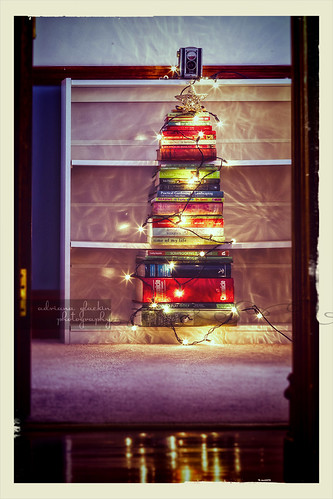
I have been protesting for the last few weeks that I'm over Christmas. Christmas hasn't arrived and already I want it to be over. Yet, despite my protestations I find that I'm photographing all manner of Christmas things. Take a look at this week's #Project52. The theme was "On the Shelf", and I chose to arrange a pile of green and red spined books into a sort-of tree. As though that isn't enough, I wrap Christmas lights around the book tree.
Week 50 ~ On the Shelf
Still not enough to stick to one version of the Books-in-the-shape-of-a-tree-arranged-on-a-shelf theme, but I tried similar versions with "Merry Christmas" overlaid on the image and taken with Lensbaby Composer. There are other compositions that are sitting on the hard drive that may never see the light of day.

And then there are shots taken with the iPhone, all with the excuse of testing out new filters and updated apps:
Merry * Merry * MerryNo willow was harmed in filtering this iphoneograph.Do I love willow? Only if it's all retro and that.Testing the updated Flickr iPhone app :)

Yet I am still insisting I want this silly season to be over. It's too hyped, too commercial, too in-your-face, too greedy, too rude, too guilt-laden, too over-the-top. While I'm loathing the lead up to The Day, I know that the day itself will be great. It will be simple and relaxed and spent with those I love and cherish and who make me laugh.  They'll take my mind off all the crassness that has become Christmas and instead remind me of the true Christmas spirit. I hope that will also be the case for you.

So that is my Christmas wish for you. I hope you spend the day with those who are dear to you, who make you laugh, who bring out the best in you and you in them. I hope that the crassness that is now Christmas hasn't soured your spirit to the point where it spoils your day. If you're feeling like I do, let's get our narkiness over and done with now, so that we can enjoy the precious time we have with family and friends.

I won't promise anymore blog posts between now and the start of the year, so this is it for 2012. Unless I change my mind, of course. Apologies for not being up to date with the #project52 posts, but they will be caught up in 2013.

Merry Christmas and may 2013 be peaceful and joyful and fun. ♥


Thursday, 15 November 2012

Ride to Conquer Cancer 2013


A few weeks ago I sent an email out to all the friends and contacts in my address book. I wanted to let them know that although I hadn't completely lost my mind, I was going to be undertaking a ridiculously difficult challenge in 2013. Much to my amusement, several friends contacted me to let me know that my email was spamming them. Conversation as follows:

Me: Oh hi friend!

Friend: Oh hi, ummm, I think your email is sending out spam.

Me: Oh no! Really! I'm so sorry! I hope your computer didn't get infected by any nasties!

Friend: No, nothing like that. Just some long winded email with lots of links at the bottom. No way was I going to click on those links. Pffftt!

Me: Ummm, did you happen to notice what the blurb was about? Did it happen to mention anything about a bike ride?

Friend: Now that you mention it...it did... a 200km bike ride - No wait... you're not doing that are you? *look of astonishment followed by look of disbelief* Bhahahahaha! You are doing that!

Me: Yeh, I am, and that email isn't spam. It's a real email from me. I wrote that long winded blurb and those links go straight to my page over at the Ride to Conquer Cancer. I'm so excited, it's going to be fun and I can't wait! (and I'm not even joking here people).

Now that I've been able to clear up with a few of my friends that I am indeed doing this challenge and that the email was in no way spam, I'm not offended one little bit that some of my friends think the challenge is beyond ludicrous. (sniff...) And do you know why? Because two friends completed the challenge this year and they said it was fun, and they're never wrong about stuff that's fun. Because I will be joining three friends who have also signed up to take part in this challenge, and it's always easier to face up to a challenge when you're with your friends. Because I know that even though my friends laugh and think it's madness on my part, I know they'll support me in any way they can.

It's going to be all sorts of challenging -  physical, financial and emotional. I knew it would be emotional, but just how emotional was evident when I opened up the email to let me know that one of my friends had left wonderful words of encouragement and had already donated - I burst into tears. It's going to get a whole lot more emotional, isn't it...

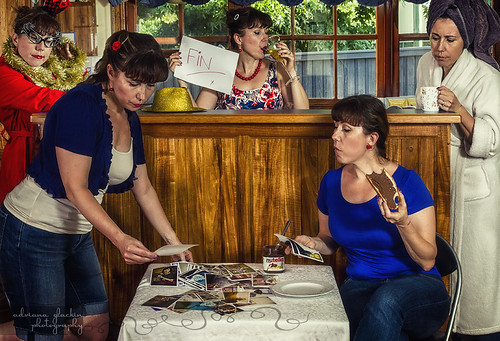
So please, if you've read this far, then do me a favour and please link this on your FB, Google+, twitter or whatever your favourite social networking site is; consider making a donation (anonymously if you prefer); leave me a message of support in the comments below. I'll keep this blog up to date with how the training, and the whole process, is going. Speaking of training, that won't start up for a few more weeks due to some health things that are being finalised. Now, please clickity click on the startled housewife portrait above and view my page to find out more information about this insane challenge.

Oh, forgot to point out that there is a widget in the margin of this blog that directly links you to my page. Do visit and consider donating. Let's see if we can conquer cancer :)

Red Bubble Gallery

Red Bubble Gallery
view my photography at Red Bubble